Methodology
(Original Document)
Overview
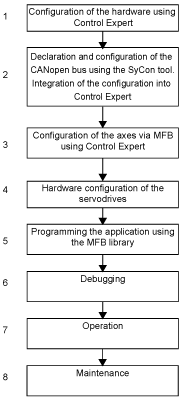
The flowchart below lists the various stages involved in installing the application:
The table below details the tasks to be performed for each stage of the flowchart:
Step
Description
1
In Control Expert:
  • create the project and select the processor,
  • declare the communication cards (TSX CPP 110).
2
In SyCon:
  • create a CANopen bus configuration project,
  • copy the .EDS files,
  • declare the CANopen master (TSX CPP 110),
  • declare the CANopen slave (Lexium),
  • configure the PDO exchanges,
  • save the SyCon CANopen project as a .CO file.
In Control Expert:
  • integrate SyCon file from the configuration screen of the TSX CPP 110 CANopen communication card,
  • enable CANopen configuration,
  • check the accuracy of the configuration using the CANopen configuration tree structure in the project browser.
3
Create the axes in the project browser’s Motion directory.
Define the variables associated with these axes during their creation.
4
With the Lexium CT software:
  • connect to the device,
  • enter the required parameters for correct operation of CANopen communication (address, speed, motor associated with the servodrive, etc.).
5
Program the motion sequences using the appropriate function blocks from the MFB library.
Associate the variables defined during creation of the axis with the MFB blocks.
6
Debug the axis using Lexium CT.
In Control Expert:
  • debug the program via the animation table,
  • use the data via the operator screens.
7
Manage the production recipes using the appropriate function blocks from the MFB library:
  • create and back up the recipes,
  • transfer data from the recipes.
8
Data backup and restore procedures.